

If you’re investigating why OpenText archiving stopped, restarting services may hide the symptom without resolving the cause. The archive service may be healthy, whilst a hand-off several steps earlier has failed.
A stalled queue doesn’t point to one obvious culprit. The blockage could sit in the source system, connector, OpenText platform, database or archive destination. Meanwhile, records wait and application, database and infrastructure teams each hold only part of the picture. A growing backlog is a reason to trace the workflow, not to restart services blindly.
This guide shows you how to identify the last successful processing stage, gather evidence for investigation and restore processing carefully. Follow the archive hand-offs in sequence, check where work is accumulating, and verify that queued items move again after corrective action. The aim is to establish a clear fault boundary and restore normal processing without guesswork across system layers.
OpenText archiving stopped: identify what has actually stalled
Expected content isn’t reaching its archive destination. That is the operational symptom, but it doesn’t tell you whether processing has stopped, slowed or is still working through a queue. The distinction matters: each condition calls for a different response, and a restart won’t necessarily address the underlying fault.
Start with two questions: what was the last item confirmed as successfully archived, and when did processing appear to change? Record the item or batch reference and the time shown in the relevant system evidence. This gives teams a shared starting point instead of competing assumptions about where the problem began.
How to tell stopped archiving from a processing backlog
Stopped processing means items no longer advance through a workflow stage. Delayed processing means items are progressing more slowly than the normal operating pattern. Queued processing means items are waiting for a stage to handle them. A queue can exist during normal operation.
Compare recent processing timestamps with the usual pattern. Check whether new items are entering the workflow, completed items are leaving it, and items remain at the same stage. A growing backlog is a reason to investigate, not proof of a particular fault. A temporary rise in incoming work or slower downstream processing can also leave items waiting.
Which business and technical boundaries may be involved?
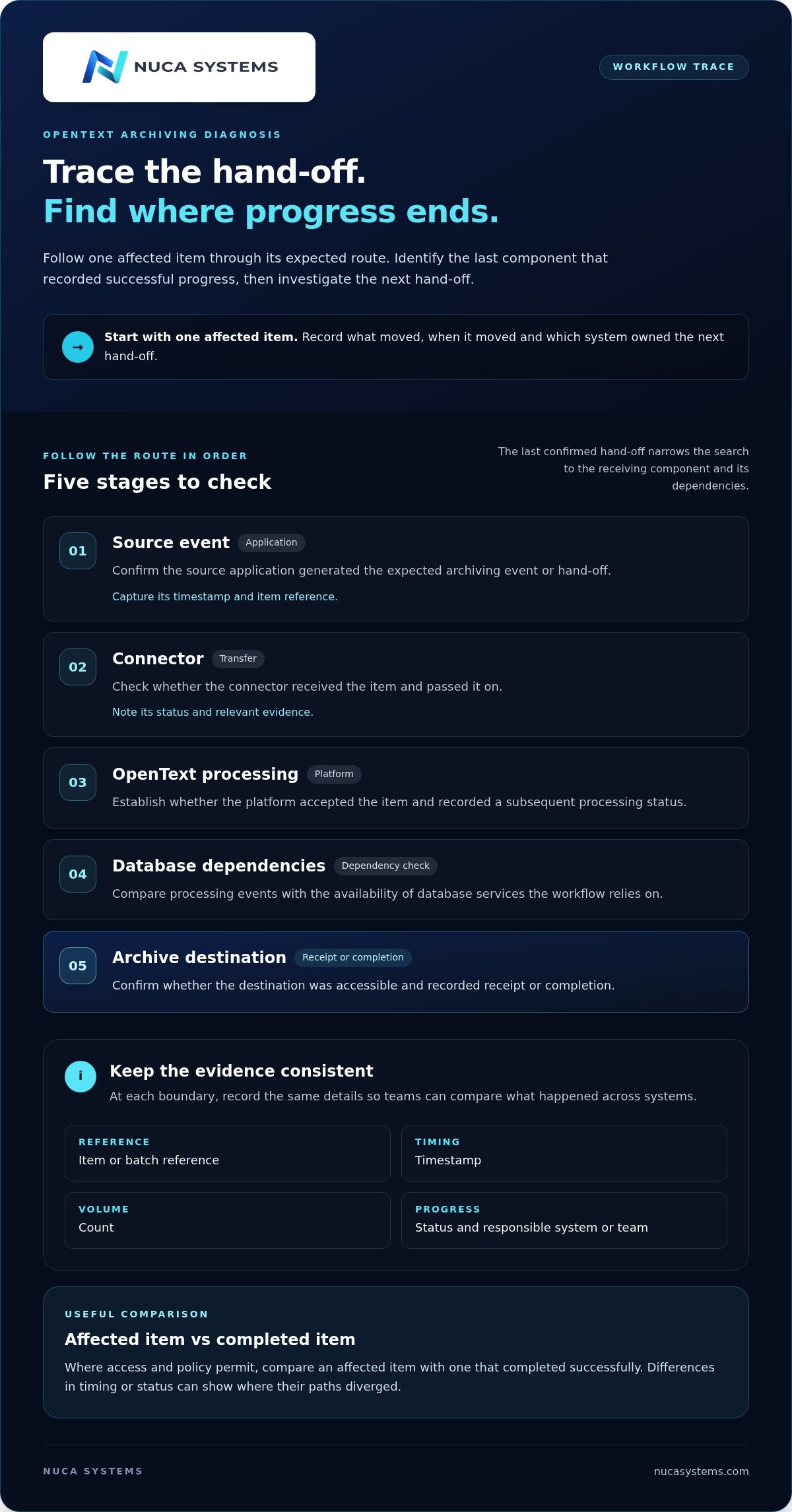
Map the route an item should take: a source application creates or selects content, a connector passes it on, the OpenText platform processes it, database dependencies support that work, and the archive destination receives the result. The details differ between estates, so follow the actual route for the affected content.
These boundaries often cross team responsibilities. Application staff may see the source event; connector owners may see whether it was passed on; platform and database teams may hold evidence about processing; storage teams may be responsible for the destination. Note the last stage with confirmed progress, then identify which system owns the next hand-off.
An OpenText archiving stoppage is a break in progress: expected items no longer advance from one workflow stage to the next within the normal operating pattern. This definition keeps the investigation focused on observable movement, not just the presence of a queue or an error message.
Trace the OpenText archiving workflow to find the failed hand-off
Once you’ve established that items aren’t progressing, follow one affected item through the route it should take. Don’t begin with a service restart or assume the archive destination is at fault. Find the last component that recorded successful progress, then focus the investigation on the next hand-off.
Use a consistent record at each boundary: item or batch reference, timestamp, count, status and the system or team responsible. Where access and policy permit, compare an affected item with one that completed successfully. Differences in timing or status can help pinpoint where their paths diverged.
- Source event: Confirm the source application generated the expected archiving event or hand-off. Record its timestamp and item reference.
- Connector: Check whether the connector received and passed on the item. Note its status and relevant evidence using procedures for your product and version.
- OpenText processing: Establish whether the platform accepted the item and recorded a subsequent processing status.
- Database dependencies: Compare processing events with the availability of database services the workflow relies on.
- Archive destination: Confirm whether the destination was accessible and recorded receipt or completion.
Check the source and connector boundary first
Start upstream. If the source didn’t create the expected event, downstream checks may not explain why that item is absent. If the event exists, look for evidence that the connector received it and attempted the next hand-off.
On an Archive Center estate the route usually runs through four components, in this order: the Document Pipeline (the DocTools queues that process incoming items), the Document Service (which stores and retrieves the components), the Storage Manager, STORM (which drives the storage devices and pools) and the archive storage itself, with the Administration Server and Administration Client as the place you watch all of it from. Distributed estates may add an Archive Cache Server in front. Knowing that order tells you which component owns the next hand-off once you have found the last one that confirmed progress.
If SAP is the source, the queue sits on the SAP side first, and that is where to look before touching Archive Center. Transaction OAM1, the ArchiveLink monitor, shows the storage queues, the asynchronous requests still "awaiting confirmation" and the errors the content repository has reported, and it lets you re-execute stuck units once the fault is fixed. OAC0 holds the content repository definitions, so a repository that cannot be reached shows up there. Keep that SAP evidence separate from the Archive Center trace: capture the event, time, status and error, then follow the item across the boundary.
Follow processing through platform, database and destination
For each affected item, identify the last component that recorded successful progress. Then compare platform events with database availability and destination accessibility around the same time. A platform event without a corresponding destination receipt narrows the search differently from an item that never appears in platform processing.
The last successful hand-off narrows the investigation by identifying the boundary after which progress is unconfirmed. This directs checks towards the receiving component and its dependencies instead of every system in the estate.
Keep the trace with the incident record. A clear account of what moved, when and between which systems is the evidence the next team, or OpenText support, will ask for first.
When evidence points to a fault spanning platform, database and business-process ownership, Nuca Systems’ production OpenText support brings these operational responsibilities together under one SLA.
OpenText archiving queue checks: use evidence, not assumptions
A queue view is a snapshot, not a diagnosis. To understand whether OpenText archiving stopped, compare observations over consistent intervals and record what changes. One error message may identify a symptom, but it doesn’t confirm the root cause or show that every item is affected.
What queue movement and timestamps can tell you
Capture queue depth at regular intervals that suit your normal processing pattern. For each observation, note whether items are entering, completing or repeatedly failing at the same stage. Record the last successful completion and the first observed failure, if there is one. This shows whether the queue is growing, holding steady or draining. A single count cannot show that trend.
Build a short evidence list:
- Queue trend: counts and observation times, using the same measure each time.
- Processing times: last successful item, first failure and any gaps between stages.
- Error pattern: exact message, frequency and stage, without treating it as a confirmed cause.
- Affected scope: one item, a batch, a content type or a wider set of work.
- Recent changes: configuration, patching, credentials, network paths or storage changes that may be relevant.
Keep facts separate from interpretation. “No completion recorded after this time” is an observation. “The database caused the stoppage” is a hypothesis until supporting evidence confirms it.
How to capture useful logs and change evidence
Correlate timestamps across application, connector, OpenText platform and database records where available. Check that systems use a consistent time reference, and note any known offset before comparing events.
On the Archive Center side, the Document Pipeline tools show exactly which queue an item is sitting in: Document Pipeline Info for the queues and their DocTools, dpqstatus for the status and queue of the documents in them, and dpinfo for one document. Each component also writes its own log, and the level is raised in the Administration Client when the normal entries do not explain the stop. The exact tool and log names vary between releases, so confirm them against the administration guide for the version you run.
For an Archive Center estate fed by SAP, SAP’s own knowledge base explains how to raise Archive Center logging through the Administration Client or by editing the setup files (both need a SAP support login). Follow product-appropriate procedures and preserve the evidence needed for analysis. In shared incident notes, don’t include record contents, credentials or unredacted logs that could expose sensitive information.
If queue observations and timestamps point towards slow or unavailable database dependencies, continue the investigation by comparing the relevant database evidence with processing delays. A queue can show where progress is limited; correlated evidence helps determine whether database performance is involved rather than merely coinciding with the delay.
Restore stopped OpenText archiving safely and verify recovery
Once the evidence points to a fault boundary, restore service in a controlled way. A restart may be appropriate in some cases, but it can also remove useful diagnostic context or affect unrelated processing. Preserve logs, timestamps and queue observations first, then follow your organisation’s production change procedures.
A controlled recovery sequence for production operations
Before intervening, agree the scope of impact, identify the accountable system owner and confirm who has authority to approve a production change. Give the relevant application, platform, database and infrastructure teams the same incident record so actions don’t conflict across boundaries.
Use this sequence to keep the response focused:
- Preserve evidence: Save relevant logs, queue observations, timestamps, error patterns and recent change details before altering services or configuration.
- Confirm the fault boundary: Use the last confirmed successful hand-off to identify the component that needs attention, rather than restarting unrelated systems.
- Choose a controlled action: Address the evidenced issue under local change procedures. For any service or queue intervention, use the procedure for the specific OpenText product and version.
- Record the intervention: Note what changed, who authorised it, when it occurred and what result was expected.
If the cause remains uncertain or the issue crosses team boundaries, escalate with a concise incident record. Include business impact, affected scope, the last successful processing point, supporting evidence and actions already taken. This gives the next team a usable starting point and reduces repeated checks.
How to confirm archiving has resumed
A service appearing available isn’t enough. Track representative new items from their source event through to confirmed archive completion. Then review the queue trend and processing timestamps: new work should advance, and older queued items should begin to drain. Watch for recurring errors or items that remain stuck at the same stage.
Record the recovery point, remaining backlog and any follow-up monitoring required. If new items complete but older work doesn’t move, treat that as an incomplete recovery and investigate the affected stage before closing the incident. When OpenText archiving stopped across several operational layers, a clear owner for platform, database and business-process administration can help coordinate the response.
For production environments that need joined-up operational ownership, Nuca Systems provides production OpenText support.
Prevent another OpenText archiving stoppage with clear operational ownership
Recovery is only part of the work. To reduce the chance of another OpenText archiving stoppage, monitor processing outcomes as well as service availability. A server can respond normally whilst items fail to move through a connector, processing stage or archive destination.
Build monitoring around processing outcomes, not service status alone
Track whether expected items complete, how queue depth changes and whether errors recur. Set operational thresholds that reflect your normal processing pattern, then define who receives each alert, who investigates it and when the issue passes to another team. An alert without a named owner is just another message in the queue.
Agree what evidence must accompany a hand-off: affected scope, relevant timestamps, observed status changes and the last confirmed successful stage. This gives the next team a useful starting point.
Make ownership clear across system boundaries
Document responsibility for the source application, connector, OpenText platform, database and archive storage. Name an owner for each boundary and agree who coordinates incidents that span several teams. This matters because a fault may appear in one system whilst its cause or required action sits with another.
Review repeated incidents alongside patching, upgrade readiness and routine platform maintenance. A recurring queue pattern after a change is a reason to compare evidence and review the change, not to assume that the latest maintenance caused the fault. Record findings and adjust monitoring or ownership where the hand-off proved unclear.
For production environments, platform support, database administration and business-process administration can sit under one operational SLA. Nuca Systems provides these services with monitoring around the clock on every tier, critical-incident response 24×7×365 on Tier 2 and Tier 3, patching and upgrade readiness. Interim operational cover can also help maintain continuity during specialist absence or staff transitions, when responsibilities might otherwise become uncertain.
Clear ownership won’t prevent every fault, but it can reduce time spent working out who should act next. Explore Nuca Systems’ OpenText managed services for joined-up operational support.
Keep archiving moving with clear ownership
If OpenText archiving stopped, the safest response starts with evidence: establish the last successful processing point, trace the hand-offs and distinguish a genuine halt from a queue that is still moving. Preserve the diagnostic record before intervention, then verify recovery by confirming that new items complete and the backlog is draining.
Prevention depends on more than server availability. Monitor processing outcomes and recurring errors, and make ownership clear across application, connector, platform, database and storage teams. That structure helps ensure an issue has somewhere to go when it crosses team boundaries.
Nuca Systems provides senior-led platform, database and business-process administration under one SLA, with round-the-clock monitoring and 24×7×365 critical-incident response on Tier 2 and Tier 3, for production OpenText environments. For a steadier operational model, discuss production OpenText support with Nuca Systems.
With a clear fault boundary, a controlled recovery and accountable follow-through, your team can restore processing without relying on guesswork.
Frequently asked questions
Related reading