

What if the version number is the least useful measure of risk in your OpenText estate? OpenText support for legacy versions is often treated as a yes-or-no lifecycle question. But a version label alone won’t show whether the system is well understood, recoverable and properly owned. The platform, database and business administration may sit with different teams, leaving gaps between responsibilities.
We see the same uncertainty: is continued operation manageable, or is the estate exposed in ways no one has checked? The answer needs evidence. Start by confirming the installed product version and checking the applicable OpenText release notes. Then assess the estate’s dependencies, operational controls and support ownership.
Estates often remain on older versions for practical reasons. Customisations or modules may need re-testing before a change, integrations such as SAP may have been validated against the current version, regulated industries may require formal validation, and upgrades carry cost and risk of their own.
This article sets out how to establish the current condition, compare continued operation with specialist support and upgrade preparation, and identify the next checks and escalation boundaries. You’ll have a practical basis for deciding what the estate needs next, and who should own each part of that decision.
What does support for a legacy OpenText version mean in a live estate?
Legacy-version support is the estate’s ability to operate, maintain and recover a specific installed configuration, considered separately from the product’s vendor lifecycle status. A lifecycle label describes a product version. It doesn’t tell you whether your team can investigate an incident, restore service or manage a change safely.
We see these questions get blurred when “legacy” becomes shorthand for “unsupported”. OpenText release notes and product documentation are the authority for version-specific information. Confirm the precise product and version there before drawing conclusions about lifecycle status or available vendor support.
Does an older version automatically mean an unsupported estate?
No. Age, installation date and internal labels don’t establish a product’s support status. Start with an inventory that identifies each installed component and its exact version, then compare it with the product documentation. Record the source and the statement you verified, so the finding can be distinguished from an assumption repeated in a handover or service record.
Keep the two assessments separate. One records what the vendor documentation says about the version. The other records what your organisation can operate: whether procedures are current, access is available, incidents have clear owners and recovery steps are understood. The lifecycle record and the operational assessment answer different questions.
Which parts of an OpenText estate need to be considered?
Map only the components present in your environment. That may include Content Server, Archive Center or Extended ECM. Record each component’s version and connected dependencies using deployment records and configuration documentation rather than memory. If a dependency isn’t confirmed in the estate documentation, mark it for verification instead of treating it as fact.
Include the database underneath the platform, integrations and business-administration processes. For each, note what it does, who owns it and where its operating or change records are held. The platform team may manage application configuration whilst another team owns database maintenance, and business administrators may control workflows or user access. Those boundaries shape day-to-day operation even when every component is documented.
The result is a useful baseline, not a verdict. It separates verified version facts from the estate’s actual configuration, dependencies and ownership. That gives the next assessment a firmer starting point: what is installed, what it relies on and who is accountable for each part.
How do you establish the condition of a legacy OpenText estate?
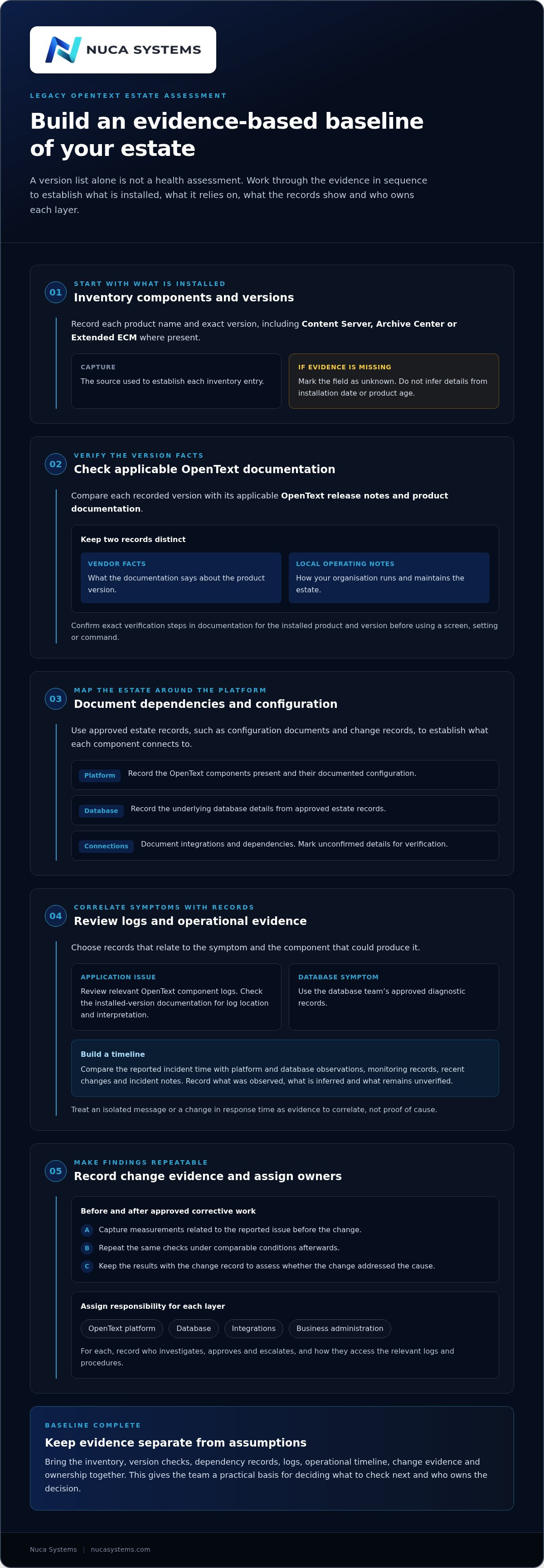
Start with evidence that can be checked and repeated. We use a sequence: inventory the installed components, verify version-specific facts against the vendor documentation, document configuration and dependencies, review relevant logs and operational records, then assign an owner to each layer. Keep the results together, with the source and date of each observation. A version list on its own is not a health assessment.
What should the version and configuration inventory record?
Record each installed product name and exact version, including Content Server, Archive Center or Extended ECM where present. Add the underlying database details and integrations using approved estate records, such as configuration documents or change records. Include the source used to establish each entry. Mark fields as unknown where evidence is missing. Don’t infer versions, database details or dependencies from an installation date or product age.
Next, compare the recorded versions with their product documentation. Keep vendor statements distinct from local notes about how the estate is operated. If a screen, setting or command is needed to verify a detail, confirm the exact steps in documentation for that product and version before using it. This avoids applying a remembered procedure to a different release.
Which logs and operational records help establish a baseline?
Choose records that relate to the symptom under investigation and the component that could produce it. For an application issue, review the relevant OpenText component logs; for a database symptom, use the database team’s approved diagnostic records. Check the product documentation for the correct log location and interpretation for your installed version. Don’t treat an isolated message as proof of cause.
Build a timeline. Compare the reported incident time with available platform and database observations, monitoring records, recent changes and incident notes. Record what was observed, what is inferred and what remains unverified. A rise in response time, for example, is a symptom to correlate with other evidence, not by itself a diagnosis.
Before any approved corrective work, capture the measurements that relate to the reported issue. After the change, repeat the same checks under comparable conditions and record the result. This gives the team a basis for deciding whether the change addressed the cause or merely coincided with a temporary improvement. Keep the change record alongside the evidence.
Finish by assigning ownership for the OpenText platform, database, integrations and business-administration processes. Name the person or team responsible for investigation, approval and escalation, and record how they can access the relevant logs and procedures. This is where OpenText support for legacy versions becomes an operational plan rather than a version label: evidence shows what is known, while named owners close the gaps that still need checking.
Which support approach fits a legacy OpenText version?
Choose a support model by looking at where work stops, not just at the number of suppliers involved. A team may have capable platform and database specialists, yet still lose time when an incident crosses between them or no one owns business administration. The comparison below focuses on operational coverage and accountability. None of these arrangements changes the version status recorded in OpenText documentation.
| Approach | Accountability | Platform coverage | Database coverage | Business-administration coverage |
|---|---|---|---|---|
| Internal ownership | Depends on named internal owners and agreed hand-offs. | Internal platform team, if assigned. | Internal database team, if assigned. | Business administrators, if included in the operating model. |
| Separate suppliers | Responsibilities sit across contracts and support boundaries. | Supplier responsible for the platform scope. | Supplier responsible for the database scope. | May remain with internal administrators or a separate supplier. |
| Unified managed-service team | One team coordinates the covered layers under an agreed service scope. | Included within the agreed scope. | Included within the agreed scope. | Included within the agreed scope. |
Use the rows to identify gaps, not to assume one model is automatically right. If an internal team owns all three layers and can coordinate incidents and changes, internal ownership may be workable. If responsibilities are split, write down who leads when an issue crosses a boundary, who gathers evidence and who approves corrective work. Those answers matter more than a supplier count.
What changes when platform and database support sit with separate teams?
Hand-offs can slow evidence gathering. The platform team may report an application symptom, whilst the database team sees no corresponding alert, and each waits for the other to provide the next diagnostic detail. That is a coordination problem, not proof that either component caused the incident. Set explicit responsibilities for incident lead, log collection, access, change approval, escalation and communication with business administrators. Keep observations and confirmed causes distinct in the incident record.
What does one accountable support team cover?
Nuca’s managed service is organised at three service depths. It provides one SLA covering the OpenText platform, the database underneath it and business administration, with scope aligned to the production estate and agreed service depth. This can make it clearer who coordinates work across those layers.
Assess the model against the gaps in your operating arrangements. If responsibility for a database hand-off, business process or incident lead is unclear, define that boundary before deciding whether to retain internal ownership, coordinate separate suppliers or use a unified managed-service team. The objective is an operating model in which each layer has an owner and cross-team work has a clear route.
What should you check before continuing to run a legacy estate?
Before deciding to continue operating, prepare a short record of what is known and what still needs attention. Prioritise checks by operational impact and evidence quality: unclear recovery ownership for a critical process needs attention before a low-impact configuration detail supported by current records. Keep routine maintenance, incident risk and upgrade planning distinct.
- Version evidence: record each installed component and its exact version, with the source of each entry.
- Ownership: name owners for platform, database and business-administration tasks, including escalation routes.
- Monitoring: identify what is monitored, who reviews alerts and how gaps are recorded.
- Incidents: review incident records for unresolved actions, unclear hand-offs or missing evidence.
- Changes: confirm configuration changes and maintenance are recorded with an accountable owner.
For each check, note its evidence source and whether the result is confirmed, assumed or unknown. A missing record is a gap to resolve, not proof of a technical fault. If a check requires a particular screen, setting or command, verify the procedure in documentation for the installed product and version before acting.
How can you tell whether the estate has clear operational ownership?
Record who owns platform administration, database tasks and business processes. Map how a production incident moves between those owners, including who leads the investigation, accesses the relevant records, approves a change and communicates with affected users. If one person holds essential knowledge, document the dependency and the procedures or access information needed to provide cover, for example through interim cover. That signals continuity risk, not necessarily a technical failure.
Escalation routes should describe the actual hand-off: which team receives the incident, what evidence travels with it and who retains responsibility until the next owner accepts it. Clarify any missing steps before relying on the arrangement during an incident.
What evidence should be ready before a patch or upgrade decision?
Gather the current configuration, relevant platform and database logs, incident history, change records and a repeatable performance baseline. Confirm the version-specific product documentation for the components in scope. Keep lifecycle questions separate from routine estate maintenance. An upgrade decision needs its own evidence and planning.
Content Management 26.2 upgrade readiness is relevant only where that upgrade is under consideration. It doesn’t replace checking the installed estate. Use the 15 OpenText estate health checks to structure a review of evidence, ownership and operational gaps. Then assign an owner and next action to each priority, rather than treating support for a legacy version as a decision based on age alone.
How can Nuca Systems support an existing OpenText estate?
Once the estate evidence and ownership gaps are visible, you can decide whether ongoing managed support would make day-to-day responsibility clearer. Nuca Systems works with existing production OpenText estates. The focus is operational continuity across the platform, database and business-administration layer.
What does Nuca’s managed service cover?
The service uses one SLA covering the OpenText platform, the database underneath it and business administration. Its scope is agreed for the production estate and set at one of three depths: Tier 1, Tier 2 or Tier 3.
The service is delivered for a fixed monthly fee. Senior-led engineers work to the agreed scope, with named people responsible for the service relationship and operational work. That makes it easier to see who is accountable when an incident crosses from Content Server or another in-scope component to the database or business administration.
The working method is deliberately evidence-led: measure before touching, prove the cause, fix at root and retest with the same numbers. In practice, the team establishes a baseline relevant to the reported issue, checks the evidence before recommending a change, and compares the same measurements afterwards. This helps distinguish a verified change in the estate from an assumption that a particular component must be responsible.
Service response is tied to the agreed depth: monitoring runs around the clock on every tier; critical-incident response 24×7×365 applies to Tier 2 and Tier 3; Tier 1 responds in core hours. Use those boundaries when deciding whether the response arrangement matches your incident priorities and internal escalation model.
What is a sensible first step if the estate needs review?
The free 45-minute continuity-check call is a practical first step. Bring the estate context, the version and configuration evidence already gathered, and the operational concerns that remain unresolved. It’s a conversation about current ownership, known dependencies and where records or escalation routes are unclear.
We find the discussion is most useful when you can point to a concrete question: who owns the database hand-off, whether monitoring covers the relevant component, or what evidence is available for an upgrade decision. You can then identify which checks should come next and who should own them. If ongoing support is appropriate, the agreed service depth can be considered against those needs rather than selected by version label alone.
For OpenText support for legacy versions, the aim is straightforward: keep lifecycle facts grounded in OpenText documentation, and make operational ownership explicit.
Make the next decision easier to own
The next step doesn’t need to settle every question about the estate. It should make the next decision clearer. Record what you know, what remains unverified and who owns each open check. Then set a review point for lifecycle evidence, operational risks and any upgrade preparation. That gives platform, database and business teams a shared basis for action, rather than leaving the decision to whoever happens to hold the most recent information.
OpenText support for legacy versions is easier to plan when operational responsibility is explicit and version facts are kept separate from local assumptions. If the estate needs a closer review, Nuca Systems brings senior-led, named engineers and one SLA across the platform, database and business administration.
Arrange a 45-minute continuity-check call with Nuca Systems to discuss your estate and the checks that should come next. A clear starting point can help your team move forward with confidence.
Frequently asked questions
Related reading